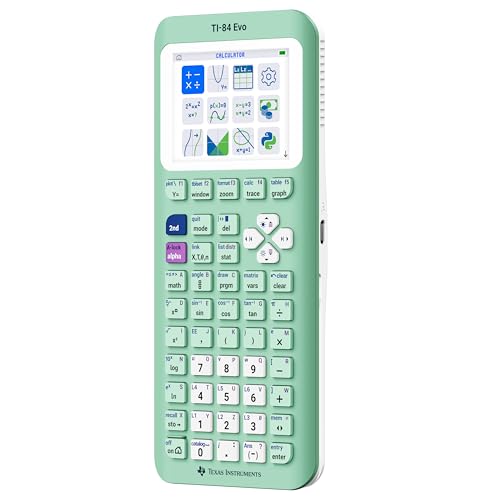
The Newest TI-84 — Faster, Rechargeable, and Easier to Navigate
For decades the TI-84 has been the calculator students are told to buy for math class, and the TI-84 Evo is the newest step in that line. The TI-84 Evo graphing calculator keeps everything that made the series a classroom standard while modernizing the parts that mattered most: a quicker processor, a redesigned home screen, USB-C charging, and Python built right in. If you are heading into algebra, geometry, calculus, statistics, or a science course that leans on graphing, this is the current model to reach for.
The biggest change you notice first is the icon-based home screen. Instead of hunting through menus, the most-used math tools sit front and center, so getting to graphing, tables, or the equation editor takes fewer steps. Texas Instruments has paired that with a faster processor for quicker calculations and smoother graphing, and a larger working area that fits noticeably more of your graph on screen at once than the older TI-84 Plus CE — helpful when you are trying to see the shape of a function or compare relationships without constantly panning around.
Practical upgrades round it out. The calculator recharges over a standard USB-C cable, so there is no fussing with disposable batteries or hunting for a special charger — the same cable that charges most modern phones and laptops tops it up. The keypad has been simplified with larger buttons and less clutter, which makes it faster to work through problems and friendlier for newer users. And with Python programming on board, students can move beyond number-crunching into real coding, a skill that carries well beyond the math classroom.
It comes in a range of colors, including Mint, Pink, Raspberry, Silver, Teal, and White, so you can pick a look you like or make yours easy to spot in a shared classroom set. A 2.8-inch color LCD keeps graphs and menus clear, the whole unit weighs about 7 ounces so it travels easily in a backpack, and it is backed by a one-year limited manufacturer warranty.
This is a device you buy once and use for years. Students rely on it through several grades of math and science, and its familiarity means teachers can guide a whole class using the same tool. One honest note worth planning around: standardized tests each publish their own approved-calculator list, and because the Evo is a brand-new model, it is smart to confirm it appears on the current approved list for your specific exam — such as the SAT, ACT, AP, or IB — before test day. For everyday classroom and homework use, it is ready to go out of the box.
Pros
- Newest TI-84 with a faster processor and smoother graphing
- Icon-based home screen puts common tools within quick reach
- Recharges over USB-C — no disposable batteries needed
- Python programming built in for coding beyond math
- More on-screen graphing space than the TI-84 Plus CE
- Simplified keypad with larger, less-cluttered buttons
- Several color choices and a one-year manufacturer warranty
Cons
- Premium price compared with a basic scientific calculator
- As a new model, some third-party tutorials are still catching up
- Graphing calculators carry a learning curve for first-time users
- Confirm it is on your exam’s current approved-calculator list before test day
Tap Buy on Amazon to check today’s price and see all available colors.
As an Amazon Associate, I earn from qualifying purchases.